Introducing Vyb - Our First Design Model That Understands Taste
Image generation models have become the de-facto standard for creating visuals. They generate pixels, providing beautiful results, quickly and easily. But they copy the patterns they see online and sacrifice fidelity to the user’s input images, fonts, and colors in an attempt to fit common patterns. In doing so, they make every design look like everyone else’s.
Today, we are introducing Vyb, the first design model that understands a user’s taste. A user’s taste is most often expressed as their choices in images, fonts, colors, and layouts. Designers have long used layers to maintain fidelity to each user’s unique choices while simultaneously constructing compelling one-of-a-kind designs. With layers, text stays text, graphics stay vectors, and photos stay pixels. Each layer preserves the user’s choices and is modified one-at-a-time to maintain fidelity. By thinking in layers, Vyb inherits these powerful properties.
How layers preserve the user’s taste
It is natural to ask, if visuals are ultimately viewed as pixels, do we still need layers? Not only are layers a more efficient way to express text and graphics, but they provide fundamental benefits in terms of quality.
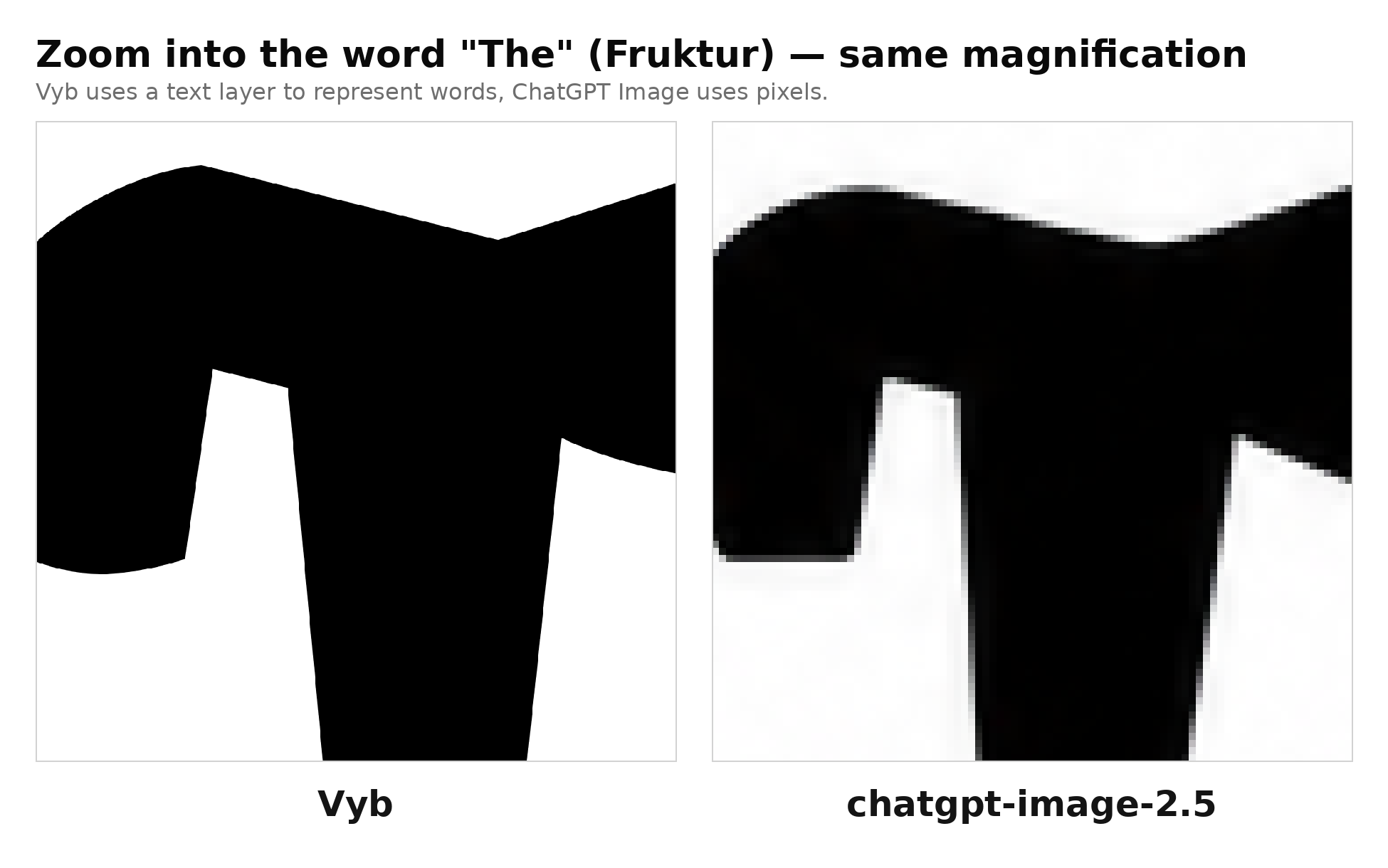
As shown above, the quality of text is degraded when using an image model that outputs pixels. What happens when you have high-quality, high resolution visuals you would like to use in a design? Image generation models, like ChatGPT Image 2.5 can only generate images at 8.3MP (Megapixels). The latest iPhone cameras capture at 48MP, and professional setups can capture at 150MP. By opting for a flat pixel generation, you degrade the quality of all your visuals.
But layers don’t just help support higher resolutions, they dramatically improve fidelity to the user’s input.
Font fidelity
Here we compare how effectively Vyb and top image generation models can reproduce a selected Google font. The following provides one of many examples where Vyb clearly outperforms existing models:

Clearly, only Vyb’s layered approach yielded the desired results. To demonstrate how systematic the quality gap is, we randomly selected 145 publicly available Google fonts. We asked Vyb and these other models to generate text using these fonts. We then performed a pixel comparison with a programmatic rendering of these fonts using the Python Imaging Library (PIL). The following is the result:
| Model | Shape match |
|---|---|
| Vyb (ours) | 95.3% |
| ChatGPT Image (gpt-image-2.5) | 78.2% |
| Muse (muse-image) | 59.8% |
| Recraft (recraft v4.1) | 51.2% |
| measurement noise floor | 95.8% |
We define Shape match as the IoU (intersection over union) of the generated font as compared to the programmatically rendered one. With a match of 95.3%, Vyb has significantly higher fidelity than the next-better model, ChatGPT Image.
Why not 100%? The noise floor shows the measurement error of comparing fonts through pixels. Each model is able to generate the font in a different position and at a different scale. Before calculating the pixel difference, we mathematically crop and align the generations. Anti-aliasing as well as finite image resolutions limit our ability to obtain a perfect measurement. Therefore we see that 95.8% is the highest achievable score in this metric.
Thus we see that Vyb’s approach of using layers allows it to achieve near-perfect results.
Note: these results are for publicly-available Google fonts, which have many training examples available Internet-wide. While Vyb’s approach of using layers works with custom fonts, our comparison models do not. Thus, we expect that for custom fonts, the gap will be even more stark.
Color fidelity
We see a similar pattern with fidelity to the user’s color. We asked each of Vyb and our comparison models to generate a rectangle with a specified RGB value (expressed as a hex code). We then programmatically compared the pixel values of the generations with the specified RGB value. The following table shows the results:
| Model | Max per-channel error (averaged) |
|---|---|
| Vyb (ours) | 0.00 |
| ChatGPT Image (gpt-image-2.5) | 4.12 |
| Muse (muse-image) | 5.63 |
| Recraft (recraft v4.1) | 27.79 |
We calculate the max per-channel error (out of 255) for every image and report the mean across images. Therefore, we see that our layered approach enables us to achieve perfect results, unlike all other models in our comparison set.
Edit Fidelity
A powerful property of layers is they allow each edit to be controlled individually. We can make changes without regenerating the entire image and degrading the user’s input. The following shows what happens when we ask Vyb as well as other models to perform a simple text edit.
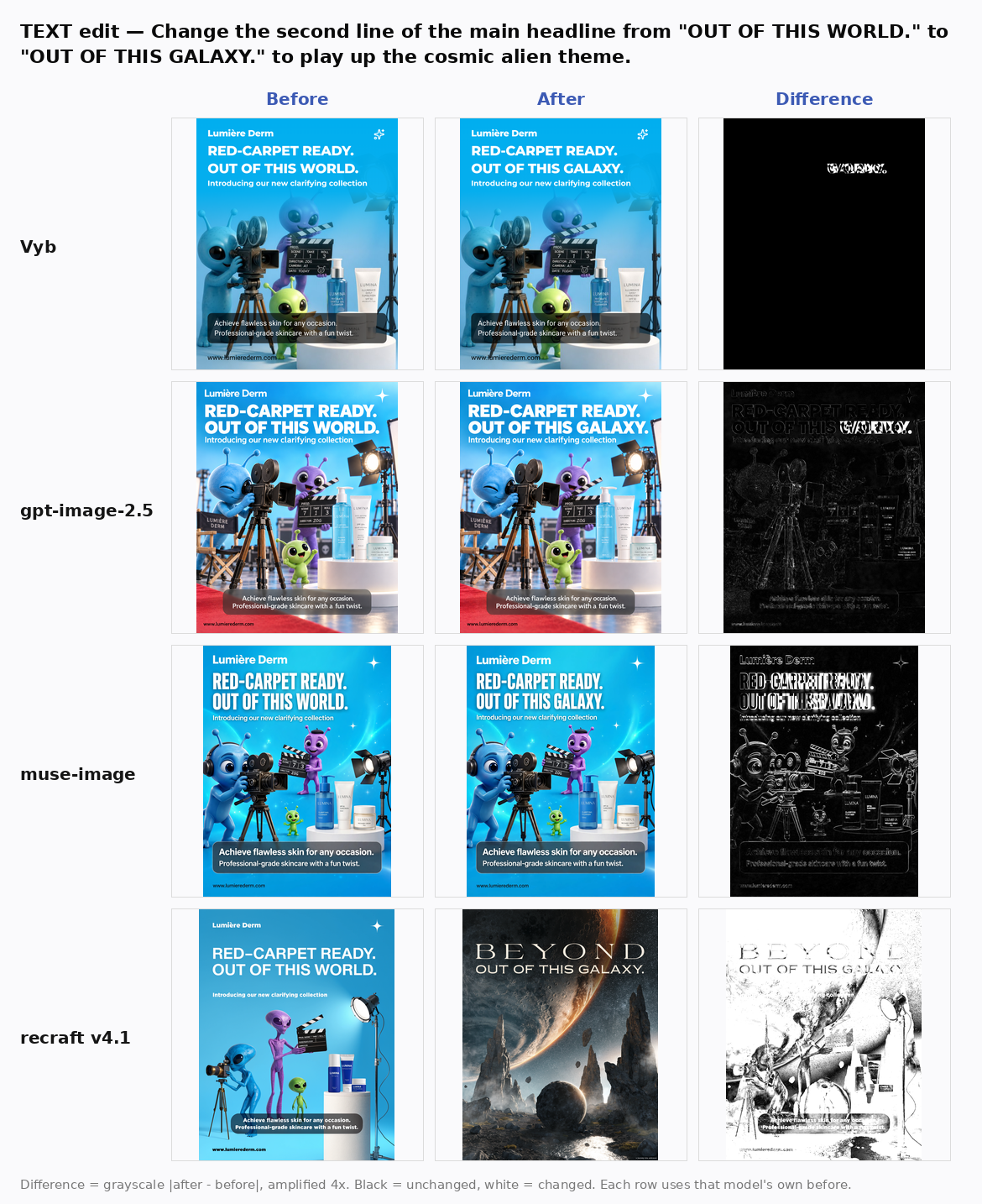
We amplify the difference by 4x so that it can more easily be seen through visual inspection. As can be seen here, Vyb only modifies the region associated with the text change. The remaining models each introduce unrelated edits when attempting to change the heading.
To quantify this result, we compute the mean number of pixels changed over 200 edits. These edits span color change, adding / removing assets, changing font sizes, changing text and so on. Overall we have the following results:
| Model | Mean change |
|---|---|
| Vyb (ours) | 11.3% |
| ChatGPT Image (gpt-image-2.5) | 95.9% |
| Muse (muse-image) | 90.7% |
| Recraft (recraft v4.1) | 99.2% |
Here the mean change is the average number of pixels that changed in an edit. The smaller the number the fewer unrelated pixels were affected. For all of these changes, we had an independent LLM reviewer verify that Vyb correctly implemented the edit being requested.
We see here that Vyb is able to satisfy the query with a much smaller change to the design as compared to other models. By minimizing the changes to unrelated parts of the image, Vyb minimizes the degradation of the user’s input.
Imagine what happens across multiple edits as unrelated portions of the user’s image are randomly changed while the model tries to satisfy the user’s request.
How Vyb Vibes
Our goal was not to build yet another image generator. Instead, it was to create a model that combines the user’s assets (images, fonts, colors), layer by layer, into a compelling design. By giving Vyb the ability to call image generators, as needed, to complement the user’s assets, we empowered it to focus holistically on design.
Our first realization was that design does not have a standard format unlike web (e.g html / css). Instead each design tool has its own proprietary internal format to represent designs.
So, we created a new language called Cocolang, which is ideally suited for AI to create designs. Cocolang has the following unique properties:
Unique layer representation: text stays text, graphics stay vector, and images stay pixels. Our language supports this fully and is even extensible to motion graphics.
Context-window efficient: visual media is inherently token-heavy and quickly exhausts the context windows, especially of smaller models. Cocolang enables the model to use the most efficient encoding for every layer, effectively managing the context window.
Easily editable: While the language is terse to promote model efficiency, both humans and AI can easily edit the designs it encodes.
So how do we train our model? The Internet has an enormous amount of designs available as flat images. But, very few layered designs are publicly available. We addressed this problem by developing a new, proprietary data pipeline that teaches our model about real designs and how to construct them layer-by-layer. Our model has a nuanced understanding of visuals, purposeful asymmetry, and unique combinations / overlays.
When combined, these innovations unlock the ability to create unique, compelling designs that preserve the taste of each user. Further, by ensuring that each layer stays in the correct format, our language enables us to losslessly export to external design tools such as Figma.
So how does it look?
Here are some examples showing how Vyb generates designs. All these designs preserve the user’s inputs and are layered and editable. As you can see, Vyb effectively combines text, graphics, and images into compelling visuals.

What about de-layering models?
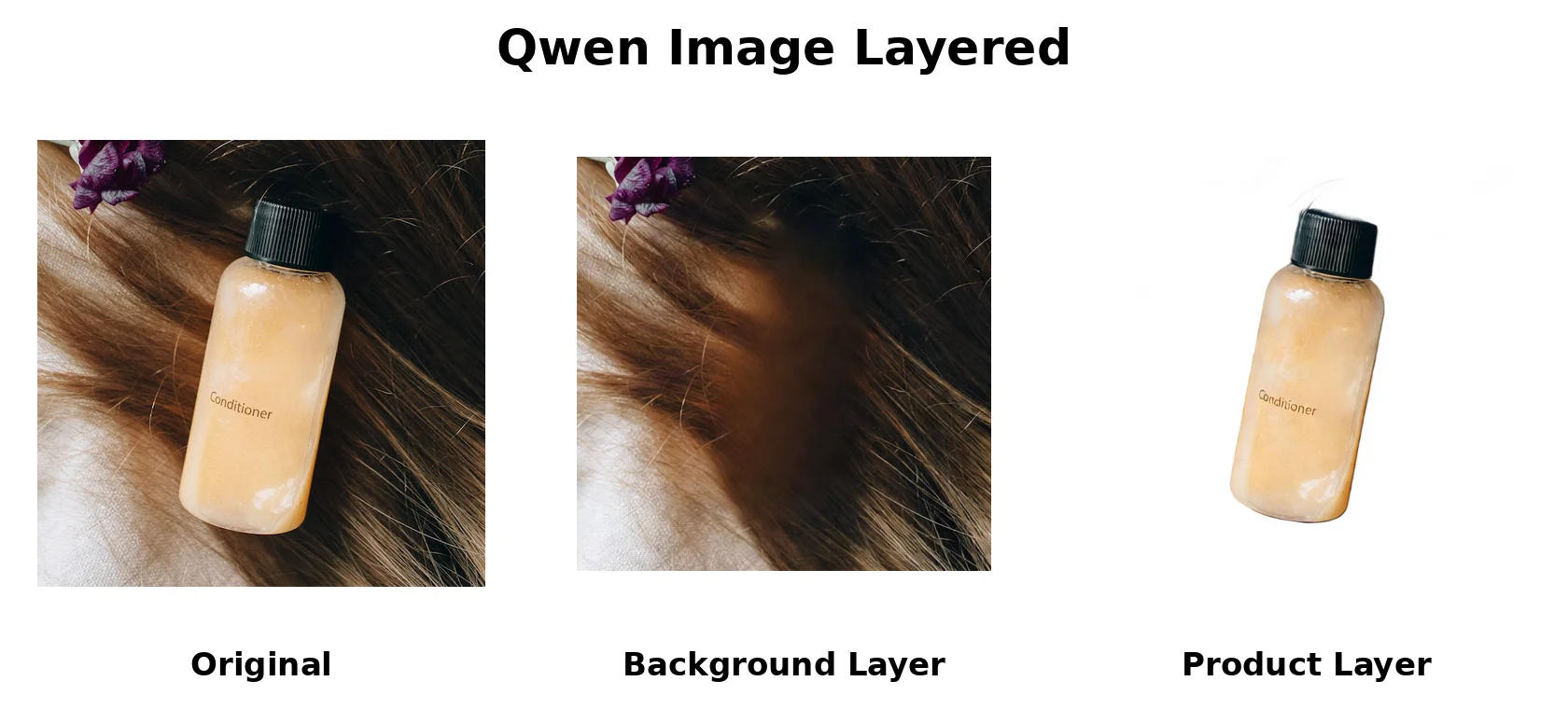
Models such as Qwen-Image-Layered take a flat image (pixels) and convert it into layers. But, where does that image come from to begin with? Most often it is created by an image generator, which has already made the design look like everyone else’s and sacrificed fidelity to the user’s inputs. Delayering after-the-fact does not solve the problem. Also, delayering does not magically convert pixels into text and graphics into vectors. They remain as hard-to-edit pixels and lack fidelity to the user's input.
Perhaps most importantly, neither the model nor anyone else knows what is behind the product or person in the image. It is forced to make an “educated guess” when it tries to fill in the contents of overlapping layers. As shown in the example below, the background is filled in with a blurry, mushy guess that clearly destroys fidelity to the user’s input.